What They Are and Why You Should Be Using Them
Ever found yourself searching through thousands of lines of CSS just to update a font colour you’ve changed your mind about? CSS Custom Properties were made for you. In this post, we’ll go through what they are, how they work, and when to use them.
CSS Custom Properties were first introduced in 2012 and became fully supported across major browsers by 2017. They allow developers to define reusable values directly in their CSS — think of it as a shared bookshelf that your whole stylesheet can access. No build tools or preprocessors needed. Instead of searching through lines of CSS for a colour or spacing value, you define it once and update it in a single place. This keeps your stylesheets cleaner, consistent, and easier to maintain. Custom Properties are particularly useful when it comes to themes, media queries, and dynamic styling with JavaScript.
How do we use CSS Custom Properties
The first step when it comes to CSS Custom Properties is to define your values. In common practice, it is best to define them under the :root selector at the top of your stylesheet. This allows your custom properties to be accessed globally throughout your CSS. To define a custom property, you use -- followed by the name of your variable. Below is an example of how it would appear:
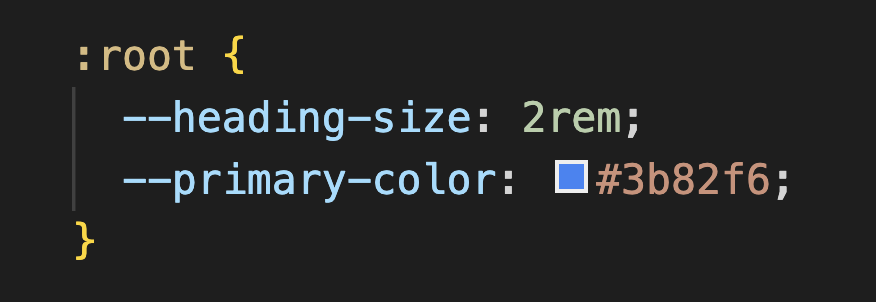
After you’ve defined your custom properties, you can apply them to any CSS property by placing them inside var(). That way, instead of updating the heading size in multiple places, you only need to update it once in the:root selector — any element using that custom property, like h1 or h2, will automatically reflect the change. Custom Properties also allow developers to give their values meaningful, descriptive names, making the code easier to read and maintain.
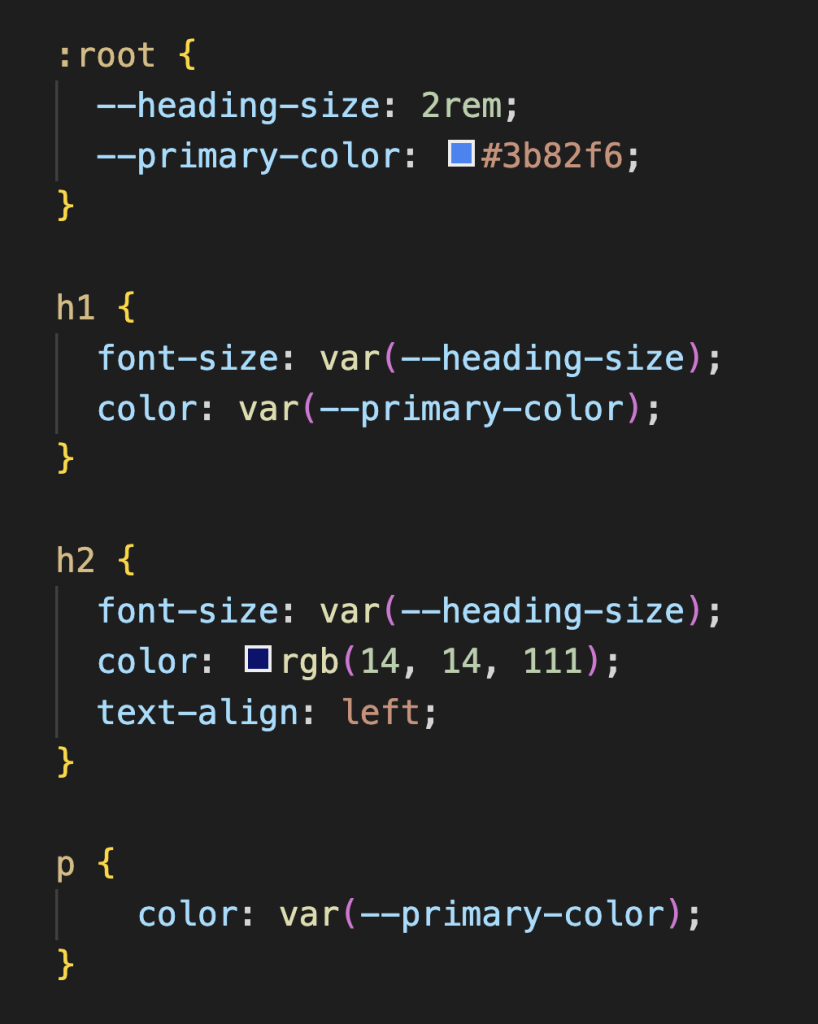
Key Use Cases
- Theming
One of the most popular uses of CSS Custom Properties is theming. Before Custom Properties, switching themes meant maintaining an entirely separate stylesheet and loading it in on demand, which was messy and hard to manage. Now, you just define your colours once and override them when needed. You would start by defining your custom properties for your default theme under:root. Then you would redefine those variables under[data-theme=’dark’]. That way all the elements that carry those custom properties will update automatically when the dark theme is active.
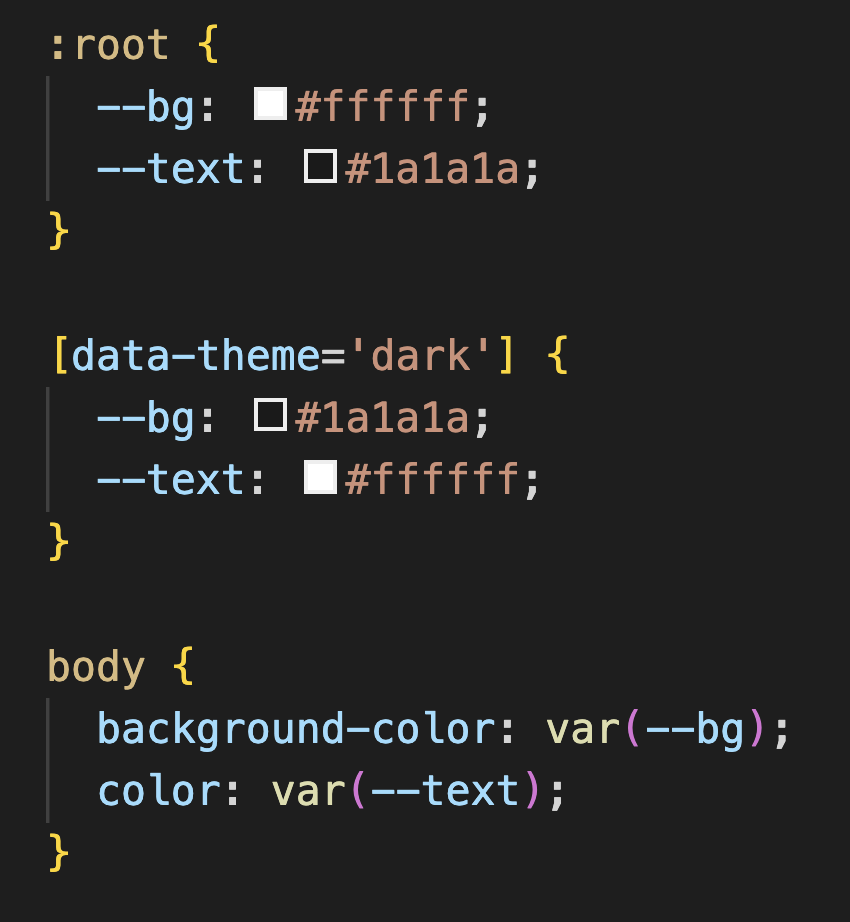
To get this working, a small piece of JavaScript toggles the data-theme attribute on your <html> tag between "light" and "dark". When it switches the browser will automatically re-read the custom properties and apply the changes. All the elements will pick up the new values instantly.
2. Responsive Design
Another great use case for CSS Custom Properties is responsive design. I remember the first responsive design project I worked on and how tedious it was because I didn’t use CSS Custom Properties. Every time I changed a colour or size, I had to manually go through a stylesheet of nearly 900 lines and change every single affected instance. Custom Properties completely eliminate that problem. You just redefine the value once inside a media query and everything updates automatically.
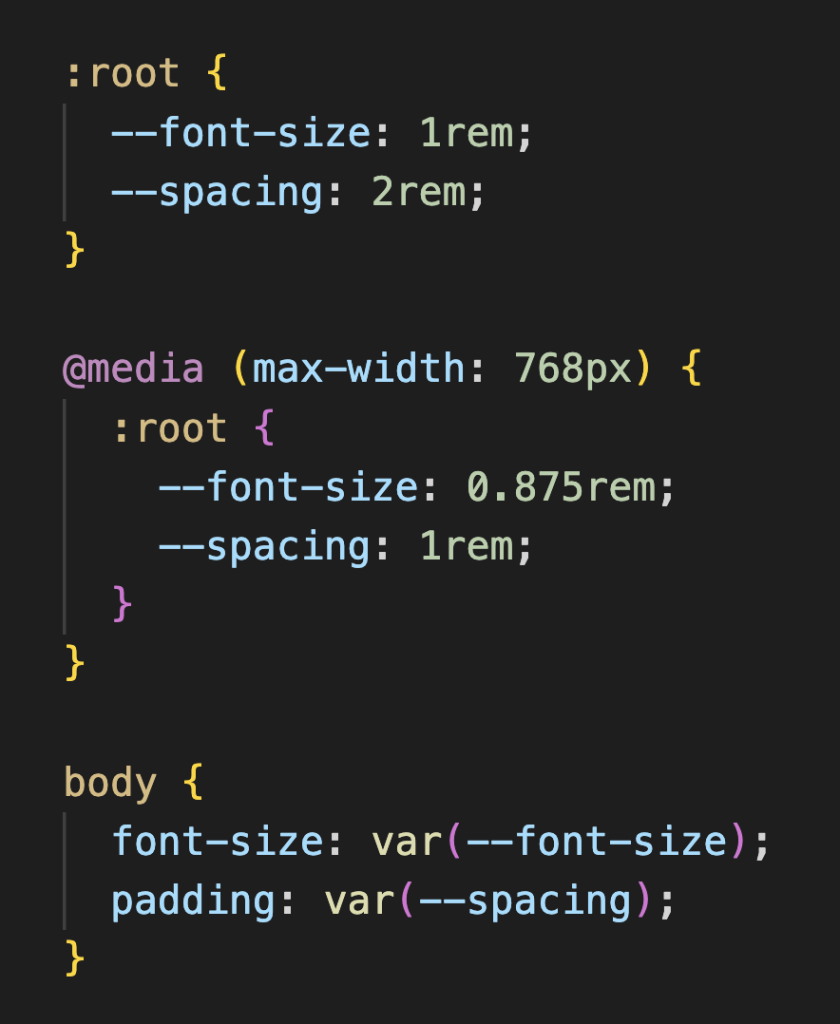
The values defined under:rootvar(--font-size) or var(--spacing)
3. JavaScript Integration
The great thing about CSS Custom Properties is that they can also be connected to your JavaScript. This is actually how the dark and light theme switching would work. You would add a button to your site that the user clicks on. When the user clicks that button it switches the data-theme<html>
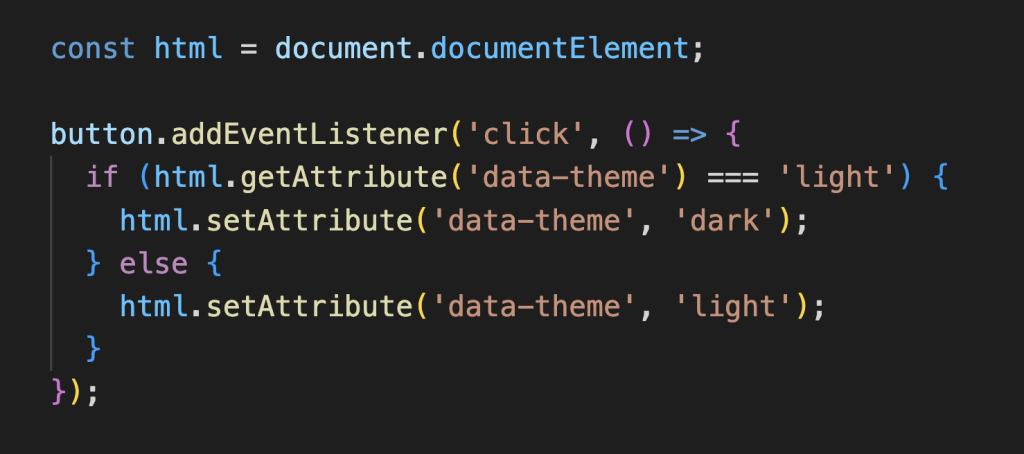
This is just one example of how JavaScript and CSS Custom Properties can work together. You can also use JavaScript to update any custom property in real time. Things like changing colours based on a slider, adjusting font sizes based on user preferences, or even driving animations based on mouse movement.
A few things to keep in mind
- Use fallback values when defining your variables. That way if a variable isn’t properly set it has something to fall back on color: var(–primary-color, #3b82f6);.
- Name your variables clearly. It’s better to be descriptive with your naming conventions, it helps keep your stylesheet functional and understandable.
- Define your custom properties at the top under the :root selector if you want the whole stylesheet to access them. Alternatively, you can define them inside a specific selector, but keep in mind that only that element and its children will have access to them.
Wrapping Up!
CSS Custom Properties are a small change but make a big difference to your CSS. They help keep your code cleaner, consistent and easier to update! They are fully supported by all modern web browsers, so you can start using them today!
If you’d like to explore further, here are some resources that helped me understand CSS Custom Properties: